<?xml version="1.0" encoding="utf-8"?>
<feed xmlns="http://www.w3.org/2005/Atom">
    <title>Passing Curiosity: Posts tagged images</title>
    <link href="https://passingcuriosity.com/tags/images/images.xml" rel="self" />
    <link href="https://passingcuriosity.com" />
    <id>https://passingcuriosity.com/tags/images/images.xml</id>
    <author>
        <name>Thomas Sutton</name>
        
        <email>me@thomas-sutton.id.au</email>
        
    </author>
    <updated>2013-10-25T00:00:00Z</updated>
    <entry>
    <title>Post banner images with Hakyll</title>
    <link href="https://passingcuriosity.com/2013/hakyll-post-banners/" />
    <id>https://passingcuriosity.com/2013/hakyll-post-banners/</id>
    <published>2013-10-25T00:00:00Z</published>
    <updated>2013-10-25T00:00:00Z</updated>
    <summary type="html"><![CDATA[<p>I’ve just created a new <a href="https://github.com/thsutton/hakyll-banner-images-demo">hakyll-banner-images-demo</a> repository on GitHub
which demonstrates how your <a href="http://hackage.haskell.org/package/hakyll">Hakyll</a> site can:</p>
<ol type="1">
<li><p>Associate a banner image with each post.</p></li>
<li><p>Generate multiple versions (sizes) of these banner images.</p></li>
<li><p>Provide the generated images in variables for use in post templates.</p></li>
</ol>
<p>Each post in the site is represented by a directory containing an <code>index.md</code>
Markdown file and, optionally, a <code>banner.png</code> image file. This repository
contains two posts, one with and one without an image:</p>
<pre><code>posts/2013-10-23-post-without-banner/index.md
posts/2013-10-24-post-with-banner/banner.png
posts/2013-10-24-post-with-banner/index.md</code></pre>
<p>The <a href="https://github.com/thsutton/hakyll-banner-images-demo/blob/master/site.hs"><code>site.hs</code></a> Haskell program contains only the most basic Hakyll
directives to process the Markdown files (indeed, I haven’t even bothered to
override the date code; you’ll need to put the date in the Markdown file
metadata). In addition, it contains the proof-of-concept code to handle the
banner images.</p>
<p>The <code>imageProcessor</code> function is a helper to construct the Hakyll <code>Rules ()</code> to
process a set of banner images and the <code>Context a</code> allowing them to be used in
the associated posts and templates. This function takes a <code>Pattern</code> which
matches the banner images and a list describing the different versions to
generate of each image.</p>
<div class="sourceCode" id="cb2"><pre class="sourceCode haskell"><code class="sourceCode haskell"><span id="cb2-1"><a href="#cb2-1" aria-hidden="true" tabindex="-1"></a><span class="kw">let</span> (postImages, postImageField) <span class="ot">=</span> imageProcessor <span class="st">&quot;posts/*/banner.png&quot;</span></span>
<span id="cb2-2"><a href="#cb2-2" aria-hidden="true" tabindex="-1"></a>                                     [ (<span class="st">&quot;small&quot;</span> , <span class="dt">Just</span> (<span class="dv">200</span>,<span class="dv">100</span>))</span>
<span id="cb2-3"><a href="#cb2-3" aria-hidden="true" tabindex="-1"></a>                                     , (<span class="st">&quot;medium&quot;</span>, <span class="dt">Just</span> (<span class="dv">600</span>,<span class="dv">300</span>))</span>
<span id="cb2-4"><a href="#cb2-4" aria-hidden="true" tabindex="-1"></a>                                     , (<span class="st">&quot;full&quot;</span>  , <span class="dt">Nothing</span>)</span>
<span id="cb2-5"><a href="#cb2-5" aria-hidden="true" tabindex="-1"></a>                                     ]</span></code></pre></div>
<p>The first argument to <code>imageProcessor</code> is the pattern identifying the image to
be processed. This pattern <em>must</em> end in a full filename. The second argument
is a list of versions to create. Each version has a name (the <code>String</code>) and
image processing instructions (<code>Nothing</code> to copy the image, <code>Just (x,y)</code> to
scale and crop the image to the given dimensions using ImageMagick’s <code>convert</code>
command). This generates a <code>Rules ()</code> value to process the images (<code>postImages</code>
in the code) and a <code>Context a</code> to make them available in posts and templates.</p>
<p>The <code>Rules ()</code> value can be “run” just like any <code>create</code> or <code>match</code> statement
and the <code>Context a</code> value can be used in the context of post with a path that
matches the image pattern (ignoring the filename). This context defines one
variable for each of the image versions being generated. In this code, the
variables are:</p>
<ul>
<li><code>banner-small</code> is a 200x100 image.</li>
<li><code>banner-medium</code> is a 600x300 image.</li>
<li><code>banner-full</code> is the original image.</li>
</ul>
<p>These names are generated from the filename <code>banner.png</code> in the image pattern
(this is why the pattern must have a filename) and the name of each version.</p>
<p>With this configuration, the posts included in the repository result in the
following files being generated:</p>
<pre><code>posts/2013-10-23-post-without-banner/index.html
posts/2013-10-24-post-with-banner/index.html
posts/2013-10-24-post-with-banner/full-banner.png
posts/2013-10-24-post-with-banner/medium-banner.png
posts/2013-10-24-post-with-banner/small-banner.png</code></pre>
<p>As expected, each post has an <code>index.html</code> file and the single banner image has
<code>small</code>, <code>medium</code>, and <code>full</code> versions.</p>
<p>The implementation of <code>imageField</code> and the assumption that the pattern ends in
a file name are pretty crappy but, overall, I’m quite happy with this approach.</p>]]></summary>
</entry>
<entry>
    <title>IE performance problem turns out to be images not found</title>
    <link href="https://passingcuriosity.com/2010/ie-performance-problem/" />
    <id>https://passingcuriosity.com/2010/ie-performance-problem/</id>
    <published>2010-11-10T00:00:00Z</published>
    <updated>2010-11-10T00:00:00Z</updated>
    <summary type="html"><![CDATA[<p>Like many people including, I suspect, most of the web industry I avoid
Internet Explorer as much as I can and my cross browser (i.e. IE) testing can
be somewhat curtailed: I do it with the site in my development environment and
with an eye to degrading gracefully – if you’re using 10 year old software,
you can take the degraded experience and be happy you get that much.</p>
<p>Today I had to look at a client’s web-site to resolve a performance problem
that I’d heard of a few times but had never been able to reproduce. The
reports looked something like this:</p>
<blockquote>
<p>Can you look take a look at our site again? It’s very slow to load
the page but all the other sites I try are fast. It works find on
[manager’s] Mac but my PC and the rest are all slow.</p>
</blockquote>
<p>First things first, I fired up a Windows install in <a href="http://virtualbox.org/">Virtual Box</a> and
found that, yes, it was indeed slow on IE (but not on any other browser I
tried).</p>
<p>Given that there’s a bit of fancy schmancy JavaScript going that was my next
port of call. After a while trying to find the option to disable JavaScript
(Internet Explorer has one of the worst configuration interfaces of pretty
much any software I’ve used) I remembered that this install had the developer
toolbar installed. A quick navigate through three or four layers of menu
(Seriously Microsoft: try giving some consideration to user experience one
day. You might find you like it!) and a visit to <em>Disable -&gt; Scripts</em> and I’d
confirmed that yes, the problem was only seen with scripting enabled.</p>
<p>There are various bits of <a href="http://jquery.com/">jQuery</a> used on the site including a light-box
popup thing, a slideshow type arrangement and a few custom bits. I cloned the
site into my development environment and prepared to set to with my trusty
<code>/* */</code>. Horror of horrors, the problem went away. A few goes back and forth
over <code>hosts</code> and it was clear – the problem happened “live” (with JavaScript)
but didn’t happen at all locally. Crap.</p>
<p>As a last resort before breaking a live site to try to diagnose the issue I
<a href="http://twitter.com/thsutton/status/2242895809617920">appealed to Twitter</a>. A few responses from some helpful sorts didn’t
point out any obvious things to check (and pretty much discounted my own
theory of blaming: my favourite of Microsoft’s misfeatures, filters). In a
last ditch effort to find the problem without disabling bits of the live site
I <a href="http://twitter.com/thsutton/status/2253564831338496">appealed again to Twitter</a> for someone to jog my memory. I remembered a
site that I’d seen before (in mid-October, it turns out) that provided
performance data <em>and</em> screenshots from real browsers. <a href="http://twitter.com/nickobec/status/2256181678571520">Nick Cowie</a>
replied with the linked that saved me hours: I was looking for
<a href="http://www.webpagetest.org/">webpagetest.org</a>!</p>
<p><em>WebPagetest</em> is a free web-page performance service. Give it a URL (and maybe
set some options), wait a little while, and you get back report about your
site. Like most such things you get a screen shot, but more usefully
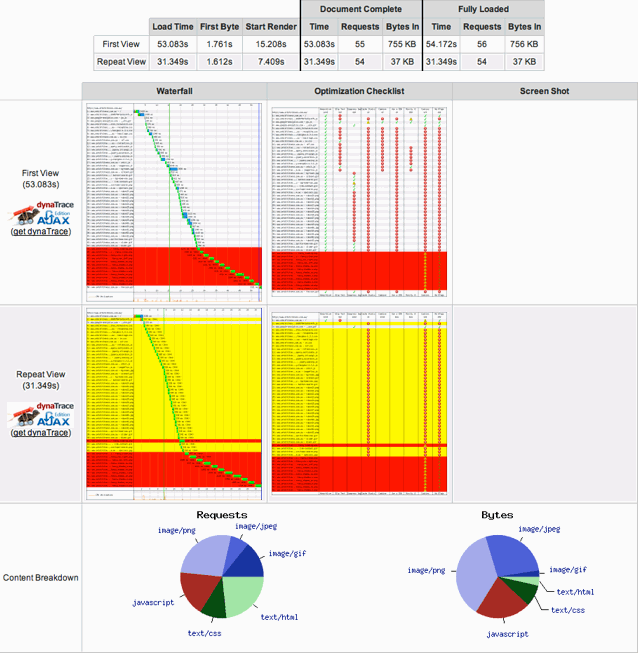
<em>WebPagetest</em> provides a timeline of fetching and rendering the page. Here’s
an edited screenshot of that first report:</p>
<figure>
<img src="/files/2010/11/ie-performance-start.png" alt="A clear performance problem!" />
<figcaption aria-hidden="true">A clear performance problem!</figcaption>
</figure>
<p>Notice, if you will, all that red and yellow and the fact that the initial
request took 53 seconds and subsequent requests took 31 seconds! A closer look
at the waterfall chart shows that around a third of the time to load and
render the page comes from those red requests – about a dozen requests that
result in 404s – so I set about fixing them. It was evident that they were
images that form the border of the <a href="http://fancybox.net/">Fancybox</a> “popup” and a quick <code>grep</code>
saw that they were referenced from <code>fancybox.css</code> with a relative path. I was
wrong when I though that filters weren’t to blame: <a href="http://reference.sitepoint.com/css/filter">Microsoft’s
<code>filter</code></a> hack interprets paths to images relative to the document
being displayed not the stylesheet it is defined in (unlike every other
reference to an external resource in a stylesheet). One such error might not
be a problem: a silly, preventable mistake, but not critical (beyond the
resource not being loaded and used). A dozen means that IE stalls for
<code>12 URLs / 2 connections * load time</code> which can be ages if your slowish CMS
is serving the 404 pages.</p>
<p>I fixed the missing files (by duplicating them to the expected location, I’m
afraid) and the load time dropped by some 20 seconds. Job done.</p>
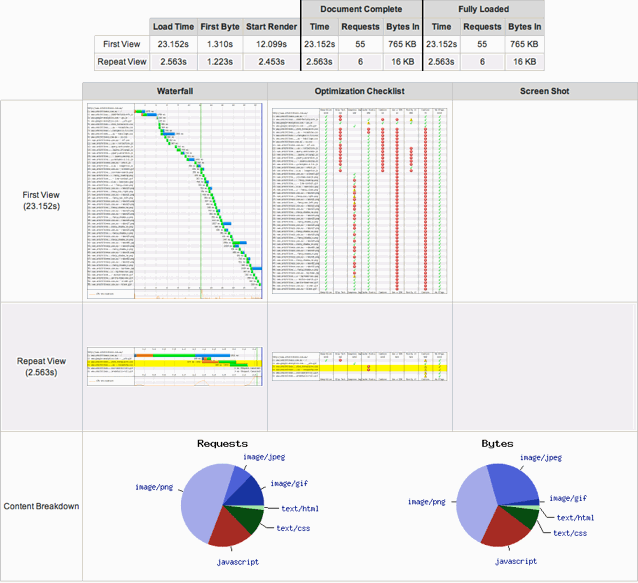
<p>All that yellow looked a bit dodgy though, so I kept going. Most of that is
indicating requests that could have been cached on the client but weren’t
because of configuration issues. I added some <a href="http://httpd.apache.org/docs/2.2/mod/mod_expires.html"><code>ExpiresDefault</code></a> server
directives and pretty much all that yellow went away:</p>
<figure>
<img src="/files/2010/11/ie-performance-finish.png" alt="A much faster site!" />
<figcaption aria-hidden="true">A much faster site!</figcaption>
</figure>
<p>Resolving a few 404 errors that slipped through the obviously gaping cracks in
our QA procedure and correcting some server configuration oversights took this
site from load and render times of 53 seconds and 31 seconds (initial and
subsequent, respectively) down to 23 seconds and 2.6 seconds!</p>
<p>There are three things that have come out of this experience:</p>
<ol type="1">
<li><p>The client’s problem has finally been resolved.</p></li>
<li><p>It’s pretty clear that I’ve got a lot of work to do improving our quality
assurance procedures.</p></li>
<li><p>It’s also clear that developing a server configuration with reasonable
defaults will result in some dramatic performance improvements.</p></li>
</ol>
<p>Now it’s time to fill these gaps so that we catch this type of issue and pick
these low-hanging fruit in our current and future work.</p>]]></summary>
</entry>
<entry>
    <title>Using ImageMagick and GD2 together with Drupal ImageCache</title>
    <link href="https://passingcuriosity.com/2010/drupal-imagecache-imagemagick-gd/" />
    <id>https://passingcuriosity.com/2010/drupal-imagecache-imagemagick-gd/</id>
    <published>2010-10-11T00:00:00Z</published>
    <updated>2010-10-11T00:00:00Z</updated>
    <summary type="html"><![CDATA[<p>A lot of Drupal sites use <a href="http://drupal.org/project/imagecache">ImageCache</a> and <a href="http://drupal.org/project/imageapi">ImageAPI</a> to automatically
scale and process images for display. Most of them (the vast majority, unless
I miss my guess) will be using the <a href="http://www.php.net/gd">GD</a> toolkit and running with <code>mod_php</code>
embedded in Apache. This is fine in most cases, but sometimes it’s definitely
the wrong thing to do; in my case, I’m processing large image files (~4M or
so) and keeping my memory limit down. The easiest way to do this is to offload
the processing to another process. Something like ImageMagick perhaps? With a
custom action from <a href="http://drupal.org/project/imagecache_actions">ImageCache Actions</a>, this is simple!</p>
<p>A quick Google led me to an article called <a href="http://drupal.org/node/641372">Create PDF thumbnails with
imagecache and ImageMagick while GD is still the default
toolkit</a> which supplies the following code
(simplified a little by removing the PDF-y bits):</p>
<div class="sourceCode" id="cb1"><pre class="sourceCode php"><code class="sourceCode php"><span id="cb1-1"><a href="#cb1-1" aria-hidden="true" tabindex="-1"></a><span class="kw">&lt;?php</span></span>
<span id="cb1-2"><a href="#cb1-2" aria-hidden="true" tabindex="-1"></a><span class="va">$w</span> <span class="op">=</span> <span class="dv">246</span><span class="ot">;</span> <span class="co">// change to your preferred thumbnail width</span></span>
<span id="cb1-3"><a href="#cb1-3" aria-hidden="true" tabindex="-1"></a><span class="cf">if</span> (<span class="op">!</span>_imageapi_imagemagick_convert(<span class="va">$image</span>-&gt;source<span class="op">.</span><span class="st">'[0]'</span><span class="ot">,</span> <span class="va">$image</span>-&gt;source<span class="op">.</span><span class="st">'.png'</span><span class="ot">,</span> <span class="dt">array</span>(<span class="dv">0</span> =&gt; <span class="st">'-thumbnail '</span><span class="op">.</span><span class="va">$w</span>))) <span class="cf">return</span> <span class="kw">FALSE</span><span class="ot">;</span></span>
<span id="cb1-4"><a href="#cb1-4" aria-hidden="true" tabindex="-1"></a><span class="va">$img</span> <span class="op">=</span> <span class="fu">imagecreatefrompng</span>(<span class="va">$image</span>-&gt;source<span class="op">.</span><span class="st">'.png'</span>)<span class="ot">;</span></span>
<span id="cb1-5"><a href="#cb1-5" aria-hidden="true" tabindex="-1"></a>file_delete(<span class="va">$image</span>-&gt;source<span class="op">.</span><span class="st">'.png'</span>)<span class="ot">;</span></span>
<span id="cb1-6"><a href="#cb1-6" aria-hidden="true" tabindex="-1"></a><span class="va">$image</span>-&gt;<span class="kw">resource</span> <span class="op">=</span> <span class="va">$img</span><span class="ot">;</span></span>
<span id="cb1-7"><a href="#cb1-7" aria-hidden="true" tabindex="-1"></a><span class="va">$image</span>-&gt;toolkit <span class="op">=</span> <span class="st">'imageapi_gd'</span><span class="ot">;</span></span>
<span id="cb1-8"><a href="#cb1-8" aria-hidden="true" tabindex="-1"></a><span class="va">$image</span>-&gt;info <span class="op">=</span> <span class="dt">array</span>(<span class="st">'extension'</span> =&gt; <span class="st">'jpeg'</span>)<span class="ot">;</span></span>
<span id="cb1-9"><a href="#cb1-9" aria-hidden="true" tabindex="-1"></a><span class="cf">return</span> <span class="kw">TRUE</span><span class="ot">;</span></span>
<span id="cb1-10"><a href="#cb1-10" aria-hidden="true" tabindex="-1"></a><span class="kw">?&gt;</span></span></code></pre></div>
<p>Alas, this code it pretty useless: because it stomps on <code>$image-&gt;info</code> any
further actions on this <code>$image</code> will probably break.</p>
<p>Thankfully, there’s an easy fix: when you update <code>$image</code>, make sure you
update everything that needs fixing. Here’s the amended code:</p>
<div class="sourceCode" id="cb2"><pre class="sourceCode php"><code class="sourceCode php"><span id="cb2-1"><a href="#cb2-1" aria-hidden="true" tabindex="-1"></a><span class="kw">&lt;?php</span></span>
<span id="cb2-2"><a href="#cb2-2" aria-hidden="true" tabindex="-1"></a><span class="co">// &quot;Thumbnail&quot; the image</span></span>
<span id="cb2-3"><a href="#cb2-3" aria-hidden="true" tabindex="-1"></a><span class="va">$width</span> <span class="op">=</span> <span class="dv">600</span><span class="ot">;</span></span>
<span id="cb2-4"><a href="#cb2-4" aria-hidden="true" tabindex="-1"></a><span class="cf">if</span> (<span class="op">!</span>_imageapi_imagemagick_convert(<span class="va">$image</span>-&gt;source<span class="ot">,</span> <span class="va">$image</span>-&gt;source<span class="op">.</span><span class="st">'.png'</span><span class="ot">,</span> <span class="dt">array</span>(<span class="dv">0</span> =&gt; <span class="st">'-thumbnail '</span><span class="op">.</span><span class="va">$width</span>))) <span class="cf">return</span> <span class="kw">FALSE</span><span class="ot">;</span></span>
<span id="cb2-5"><a href="#cb2-5" aria-hidden="true" tabindex="-1"></a></span>
<span id="cb2-6"><a href="#cb2-6" aria-hidden="true" tabindex="-1"></a><span class="co">// Load it back in as a GD resource</span></span>
<span id="cb2-7"><a href="#cb2-7" aria-hidden="true" tabindex="-1"></a><span class="va">$img</span> <span class="op">=</span> <span class="fu">imagecreatefrompng</span>(<span class="va">$image</span>-&gt;source<span class="op">.</span><span class="st">'.png'</span>)<span class="ot">;</span></span>
<span id="cb2-8"><a href="#cb2-8" aria-hidden="true" tabindex="-1"></a></span>
<span id="cb2-9"><a href="#cb2-9" aria-hidden="true" tabindex="-1"></a><span class="co">// Get the &quot;deets&quot; on the new image</span></span>
<span id="cb2-10"><a href="#cb2-10" aria-hidden="true" tabindex="-1"></a><span class="va">$info</span> <span class="op">=</span> <span class="fu">getimagesize</span>(<span class="va">$image</span>-&gt;source<span class="op">.</span><span class="st">'.png'</span>)<span class="ot">;</span></span>
<span id="cb2-11"><a href="#cb2-11" aria-hidden="true" tabindex="-1"></a><span class="va">$image</span>-&gt;<span class="kw">resource</span> <span class="op">=</span> <span class="va">$img</span><span class="ot">;</span></span>
<span id="cb2-12"><a href="#cb2-12" aria-hidden="true" tabindex="-1"></a><span class="va">$image</span>-&gt;toolkit <span class="op">=</span> <span class="st">'imageapi_gd'</span><span class="ot">;</span></span>
<span id="cb2-13"><a href="#cb2-13" aria-hidden="true" tabindex="-1"></a><span class="va">$image</span>-&gt;info <span class="op">=</span> <span class="dt">array</span>(</span>
<span id="cb2-14"><a href="#cb2-14" aria-hidden="true" tabindex="-1"></a>  <span class="st">'width'</span> =&gt; <span class="va">$info</span>[<span class="dv">0</span>]<span class="ot">,</span></span>
<span id="cb2-15"><a href="#cb2-15" aria-hidden="true" tabindex="-1"></a>  <span class="st">'height'</span> =&gt; <span class="va">$info</span>[<span class="dv">1</span>]<span class="ot">,</span></span>
<span id="cb2-16"><a href="#cb2-16" aria-hidden="true" tabindex="-1"></a>  <span class="st">'extension'</span> =&gt; <span class="st">'png'</span><span class="ot">,</span></span>
<span id="cb2-17"><a href="#cb2-17" aria-hidden="true" tabindex="-1"></a>  <span class="st">'file_size'</span> =&gt; <span class="fu">filesize</span>(<span class="va">$image</span>-&gt;source<span class="op">.</span><span class="st">'.png'</span>)<span class="ot">,</span></span>
<span id="cb2-18"><a href="#cb2-18" aria-hidden="true" tabindex="-1"></a>  <span class="st">'mime_type'</span> =&gt; <span class="va">$info</span>[<span class="st">'mime'</span>]<span class="ot">,</span></span>
<span id="cb2-19"><a href="#cb2-19" aria-hidden="true" tabindex="-1"></a>)<span class="ot">;</span></span>
<span id="cb2-20"><a href="#cb2-20" aria-hidden="true" tabindex="-1"></a></span>
<span id="cb2-21"><a href="#cb2-21" aria-hidden="true" tabindex="-1"></a><span class="co">// Clean up</span></span>
<span id="cb2-22"><a href="#cb2-22" aria-hidden="true" tabindex="-1"></a>file_delete(<span class="va">$image</span>-&gt;source<span class="op">.</span><span class="st">'.png'</span>)<span class="ot">;</span></span>
<span id="cb2-23"><a href="#cb2-23" aria-hidden="true" tabindex="-1"></a></span>
<span id="cb2-24"><a href="#cb2-24" aria-hidden="true" tabindex="-1"></a><span class="cf">return</span> <span class="va">$image</span><span class="ot">;</span></span>
<span id="cb2-25"><a href="#cb2-25" aria-hidden="true" tabindex="-1"></a><span class="kw">?&gt;</span></span></code></pre></div>
<p>Make sure that you’ve enabled the ImageMagick toolkit, drop this code in a
custom action and you’ll be on externally processing images in no time!</p>]]></summary>
</entry>

</feed>